Draft Punk - Fantasy Football
- 4.6
- Rating
- 100.00K
- Installs
- Free
- Price
 Analysis by App-foxy
Fantasy football drafts are full of small decisions that become difficult when the clock is running. I tested Draft Punk - Fantasy Football as a draft companion rather than treating it like a complete fantasy league platform, and that distinction matters. Its purpose is to help me think through selections with AI assistance, not to replace the league host, draft room, scoring rules, or my own judgment. If you want a focused tool beside your usual fantasy football setup, it has a clear appeal. If you expect a full league-management experience, you may find its role narrower than the name first suggests.
The app comes from Josh Clemm and sits in the sports category. It is free to install, suitable for Everyone, and has built a solid audience with over one hundred thousand installs. Its average rating is 4.6 from around 3.7 thousand ratings, which suggests that many users find the central idea useful. I would not read that rating as proof that every draft experience will be smooth, though. A draft companion is especially sensitive to preparation, league context, and how quickly a user can recover when something does not look right.
Getting ready before the draft clock starts
The first place I would expect users to get stuck is not the AI advice itself, but the handoff between the app and the real draft. Fantasy football leagues differ in roster construction, scoring, draft order, and player preferences. An assistant can only be as useful as the context I give it. Before relying on a recommendation, I would make sure I know exactly what my league rewards and what kind of decision I am asking the app to support.
You May Also Like

 Blood Strike: 2.5 Anniversary
Blood Strike’s Loadouts Turn Every Drop Into a Tactical Gamble
A close look at Blood Strike’s custom loadouts: how fast access to signature weapons reshapes its battle royale rhythm, rewards preparation, and narrows the gap between fights.

 Pandora - Music & Podcasts
Pandora’s Music Is Easy to Start, but Harder to Recover
Pandora’s strength is its low-effort path from a seed to a station. Its weak spot is how much confidence it asks you to place in connection, setup, and quiet recovery.

 8 Ball Pool
8 Ball Pool Is Built on Rivalries, Rematches, and Routine
A close look at the rivalries, rematches, shared routines, and unanswered safety questions that turn a quick pool match into a persistent mobile community.

 Samsung Music
Samsung Music’s Quiet Strength Is Playing What You Already Own
Its reach comes less from spectacle than from dependable access to a personal library. That simplicity is both the app’s strongest retention engine and its ceiling.

 AccuWeather: Weather Radar
AccuWeather Review: A Quick, Clear Forecast for Everyday Decisions
For everyday plans, the best forecast is the one you can understand quickly. AccuWeather makes rain timing, radar, and local conditions easy to act on, with a few trade-offs.

 Hill Climb Racing
Why Hill Climb Racing Still Turns Crashes Into One More Run
A tiny car, a bumpy hill and one more upgrade: Hill Climb Racing keeps resurfacing because its simple chaos makes every near-miss feel personal.
More From Our News Desk



That means checking the league’s scoring details, roster slots, and draft format before opening the draft companion. A recommendation that looks sensible in a standard setup may be less attractive in a league that heavily favors a particular position or uses unusual scoring. This is one of the most important practical lessons with AI fantasy football advice: the suggestion is a starting point for a decision, not an automatic instruction.
I also found it helpful to decide in advance how I would use the app during the draft. I would keep the actual league draft open in its normal service and use Draft Punk as a second screen or nearby reference. That separation makes the workflow easier to understand. The league platform remains the place where picks are made, while the companion helps me compare options and avoid making a rushed choice.
Users may also wonder whether the app can replace a fantasy football website or league app. In my view, it should not be treated that way. Its strongest role is as a focused assistant for draft decisions. The usual league service is still better for managing invitations, draft rooms, rosters, transactions, and league communication. Using each tool for the job it handles best prevents a lot of confusion.
Simple checks that prevent avoidable problems
Before draft night, I would open the app while the connection is reliable and make sure the current version is installed. The listed current version is 26.0.0, and the minimum operating-system requirement is Android 5.0. That makes it accessible to many older Android devices, but compatibility on paper does not guarantee that every phone will feel equally comfortable under time pressure. A larger screen, stable connection, and enough battery are more valuable here than they might be for a casual sports app.
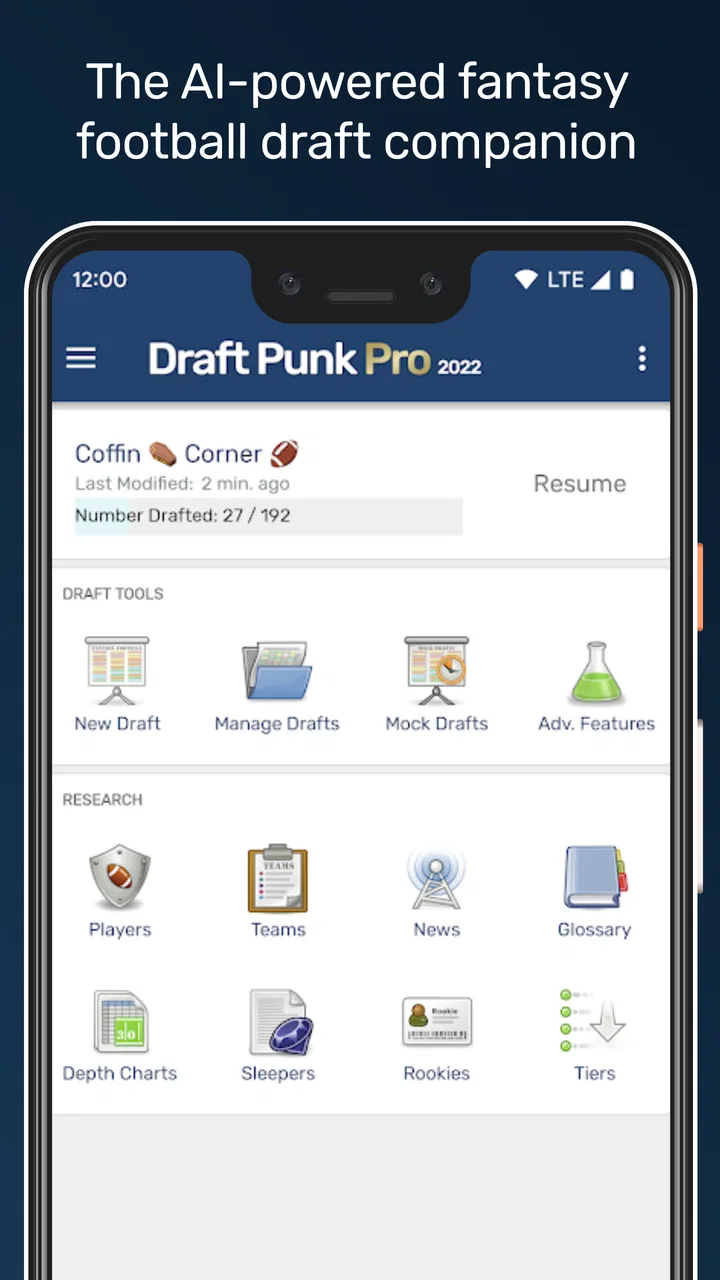
I would also avoid waiting until the first pick to learn the interface. Spend a few minutes identifying where recommendations appear, how player choices are entered, and how to return to the main draft view. Even a simple interface can feel unfamiliar when a league timer is counting down. A short practice run is a better preparation method than trying to understand the workflow while deciding between two players.
Another useful check is to keep a personal fallback list. I like having a short group of preferred players and positional priorities written down separately. This does not undermine the AI feature; it gives me something to use if the connection slows, the app needs to be reopened, or the draft moves faster than expected. The best draft companion is one that improves my preparation without becoming a single point of failure.
The free entry point makes this preparation easy to try without committing money upfront. There are optional in-app purchases priced from $2.99 to $6.99 per item, so I would review any purchase screen carefully before confirming one. For a user who only wants occasional draft help, the free experience may be enough. Someone who drafts in several leagues or wants more from the app may consider the optional purchases, but I would first establish whether they solve a real problem in my own workflow rather than buying simply because the draft feels stressful.
Recovering when the workflow breaks
When a draft companion does not behave as expected, the most useful first step is to separate the problem into three parts: the league platform, the phone or connection, and the companion itself. If the league room is not updating, changing apps repeatedly may not help. If the companion is showing something unexpected, reopening it may be more sensible than assuming the draft service is at fault.
My general recovery routine would be deliberately boring. I would note the last confirmed pick, avoid making duplicate selections, return to the draft screen, and check whether the app has caught up. If the app needs to be restarted, I would first write down the current draft position and the players already taken. That small habit prevents a restart from turning into a second problem where I lose track of the available choices.
A second screen can help, but it can also create mental clutter. I would keep only the information needed for the next decision visible. Switching constantly between a league room, a player list, and an AI recommendation can make me slower rather than smarter. A useful approach is to ask one narrow question at a time: which position should I prioritize, which available player fits my plan, or whether I should take a safe option instead of chasing upside.
The most reliable recovery tool is a written backup plan. I would prepare a few positional targets and acceptable alternatives before the draft begins. If the app becomes unavailable for a moment, I can continue manually instead of freezing. When it returns, I can use it to reassess the next pick rather than trying to reconstruct every decision I missed.
It is also worth remembering that AI recommendations can appear inconsistent when the question changes. A suggestion based on a broad draft strategy may differ from one based on a specific roster need. I would not treat that as an automatic malfunction. First, check whether the context or objective has changed. If the recommendation still seems unsuitable, compare it with league rules and my roster rather than following it just because it is presented confidently.
When the app is not the real source of the trouble
Fantasy football drafts create unusual pressure because several systems operate at once. A delayed player list may come from the league service. A missed selection may be caused by the draft clock or an accidental tap. A recommendation may feel wrong because the league uses scoring rules that do not match the assumptions in my head. Blaming the companion immediately can lead to the wrong fix.
I would check the league’s own draft status first. If the official room shows that a player has already been selected, that is the version of events that matters, even if another screen looks behind. I would then refresh or revisit the companion and continue from the confirmed state. The goal is not to make every screen agree instantly; it is to make the next decision using the most trustworthy information available.
Device limitations can matter as well. An older phone may technically meet the minimum Android requirement but still be less pleasant for rapid switching. A weak connection can make any online draft workflow feel unreliable. For an important league, I would use a stable network, keep the phone charged, and avoid testing the setup for the first time during the live event. These are ordinary precautions, but they have a greater effect on draft night than chasing a perfect recommendation.
There is also a human cause that is easy to overlook: overthinking. An AI companion can produce more possibilities than I need. If I keep reopening advice after every minor change, I may lose sight of the roster I am actually building. I prefer to use the app as a filter. Let it narrow the decision, then apply my own league knowledge and make the pick. That keeps the tool helpful without allowing it to take control of the draft.
Where it fits beside familiar alternatives
Compared with a plain rankings sheet, Draft Punk offers a more conversational and decision-oriented way to approach a pick. A rankings list is quick, transparent, and easy to print, but it usually leaves me to interpret the next move on my own. An AI-assisted companion can be more useful when I am stuck between several reasonable choices or when my roster needs have changed during the draft.
Compared with a full fantasy football platform, however, it is more specialized. The league service remains the better place for the official draft, roster records, and league activity. I would not install this app expecting it to become the central home for everything related to my league. Its value comes from sitting beside that service and helping me think, not from replacing it.
Compared with expert articles or live advice streams, the companion may feel more personal because I can use it around my own draft situation. The trade-off is that a human analyst may explain broader context, injuries, roles, and uncertainty in more depth. If I enjoy studying football news and want detailed reasoning, I would still use those sources. If I mainly need help making a timely choice, the focused format is more convenient.
That comparison also explains who should skip it. A highly experienced manager with a settled draft board may gain little from another layer of advice. Someone who wants a completely automated draft should also look elsewhere, because fantasy decisions still require attention and judgment. The app is better suited to players who understand the basics but want help staying organized and decisive when the available options become difficult to separate.
Practical ways I would use it
My favorite use case is a casual league where I know enough about fantasy football to have preferences but do not want to spend the entire week building elaborate rankings. Before the draft, I would establish a few priorities. During the event, I would consult the app when my preferred player is gone or when I am choosing between filling a position and taking the best remaining option.
A realistic example is a weekday evening draft held while I am at home, with the official league room open on one device and the companion nearby. After several rounds, my roster may look balanced in one area but thin in another. Instead of searching through multiple articles, I can use the app to focus the next decision. I would still check the player’s availability in the official room and confirm that the recommendation suits my league’s scoring before selecting anyone.
A less obvious use is preparation for uncertainty rather than prediction. I can use the assistant to challenge my first instinct. If I am determined to choose a familiar name, asking for another perspective may reveal that my roster needs a different type of pick. That does not make the AI correct by default, but it can expose a blind spot. In a long draft, that second opinion may be more valuable than another generic ranking list.
I would also use it after a disrupted plan. Suppose an early target is taken sooner than expected. Instead of abandoning my strategy, I can reassess the remaining roster needs and identify a reasonable alternative. This is where a draft companion can be more helpful than a static sheet: it supports adjustment. The trade-off is that I need to keep my questions and goals clear, or the extra flexibility can become indecision.
One practical tip is to treat recommendations as ranges of acceptable choices, not as a rigid queue. Drafts rarely follow a perfect plan. A player may disappear unexpectedly, a position may become unusually scarce, or my league mates may behave differently from what I anticipated. Keeping several acceptable paths makes the app’s advice easier to use and reduces the temptation to panic when the exact preferred pick is unavailable.
What ownership and everyday use feel like
Because the app is free to start, it is easy to test before committing to a particular draft routine. I would spend time with it before purchase decisions, especially because optional items cost from $2.99 to $6.99. The right question is not whether a paid option sounds useful in general, but whether it saves me meaningful effort in the leagues I actually play.
The Everyone age rating also makes the app approachable for a broad household audience. Still, a younger or less experienced player may need help understanding league scoring and roster strategy. The app can support a decision, but it cannot remove the need to know what the league is asking for. I would explain the reason behind a recommendation rather than presenting it as an answer that must be obeyed.
Josh Clemm’s app has also been available since August 13, 2010, which gives it a long presence compared with many short-lived draft tools. I see that as reassuring in terms of the product having an established history, while still judging the current version on how well it fits my present workflow. The current release and the app’s audience indicate that it remains an active option for Android users looking for this particular kind of assistance.
There is no reason to use it for every fantasy football task. I would open it around draft preparation and live decisions, then return to the league platform for official actions. That limited, intentional use keeps the app from becoming distracting. It also makes it easier to tell whether it is genuinely improving my draft or simply giving me more information to process.
My verdict after using it as a draft companion
Draft Punk - Fantasy Football works best when I treat it as a practical second opinion. Its AI focus gives it a clearer purpose than a basic list of rankings, while its specialized role means it should sit beside, not replace, the normal fantasy league service. I appreciate that it can help turn a vague moment of draft anxiety into a smaller decision, especially when my first choice is gone or my roster plan needs to change.
The limitations are just as important. It cannot make league rules irrelevant, guarantee that every suggestion matches my scoring format, or protect me from a poor connection and rushed workflow. Users who want full league management, deep human analysis, or a completely hands-off draft may be happier with a different tool. Experienced managers with their own carefully tested system may also find the added advice unnecessary.
For casual and intermediate players, though, I think the free starting point makes sense. Prepare the league details, test the workflow early, keep a written fallback plan, and use the AI to compare choices rather than surrendering the decision. With that approach, this sports app becomes a useful draft-night assistant instead of another screen competing for attention. That is the situation in which I would recommend giving it a try.
FAQs for Draft Punk - Fantasy Football
01What is Draft Punk - Fantasy Football, and how does it work?
Draft Punk - Fantasy Football is a companion app designed to help users prepare for fantasy football drafts and manage their decision-making. It typically focuses on player information, rankings, projections, draft strategy, and roster analysis. The exact tools may vary by version, but the app is most useful when treated as a planning assistant rather than an automatic replacement for your league’s official fantasy platform.
02Is Draft Punk - Fantasy Football suitable for beginners?
Yes, beginners can use Draft Punk, especially if they want guidance before or during a fantasy football draft. Rankings, player comparisons, projections, and draft recommendations can make unfamiliar choices easier to understand. However, new users should still learn their league’s scoring settings, roster requirements, and draft rules, because advice can become less accurate when the app’s assumptions do not match the specific league format.
03Does Draft Punk support every fantasy football league and scoring format?
Compatibility depends on the app version and the league platform or competition format you use. Before downloading, check whether it supports your preferred fantasy service, scoring system, roster configuration, and league type. Standard, half-PPR, full-PPR, dynasty, keeper, auction, and superflex leagues can require very different strategies, so users should confirm that the available settings match their league instead of relying on generic rankings.
04Can Draft Punk - Fantasy Football manage my team automatically?
Draft Punk is generally intended to provide analysis and recommendations rather than fully control your fantasy team. It may help identify draft targets, sleepers, risks, or roster improvements, but lineup changes, waiver claims, trades, and other actions usually need to be completed through the official fantasy football platform. Always review suggestions yourself, particularly when injury news, weather, depth-chart changes, or late-breaking reports affect player value.
05Is Draft Punk - Fantasy Football free to download and use?
The app’s availability, pricing, and included features can depend on the platform, region, and current release. Some tools may be free, while advanced projections, premium rankings, detailed analysis, or additional league features could require an in-app purchase or subscription. Review the store listing and subscription details before downloading, and check whether recurring charges, account requirements, advertisements, or platform-specific limitations apply.
Pros
- Quickly create and manage fantasy football leagues on mobile.
- Useful tools for tracking player performance and league standings.
- Supports competitive play with friends and other football fans.
- Clean interface makes lineup changes easy to complete.
- Regular updates can keep rosters and football data current.
Cons
- May feel overwhelming for beginners unfamiliar with fantasy football.
- Player data and features may depend on your selected league format.
- Notifications can become frequent during busy match periods.
- Some advanced options may require in-app purchases or subscriptions.
- Performance may vary on older devices or slower internet connections.

Draft Punk - Fantasy Football
Gallery